FrontForceEmergency

Every second counts.
Everyone connected.

One platform for incident and crisis management. Connect control room, crisis organisation and field teams with the same up-to-date information. From the first report to the final evaluation.

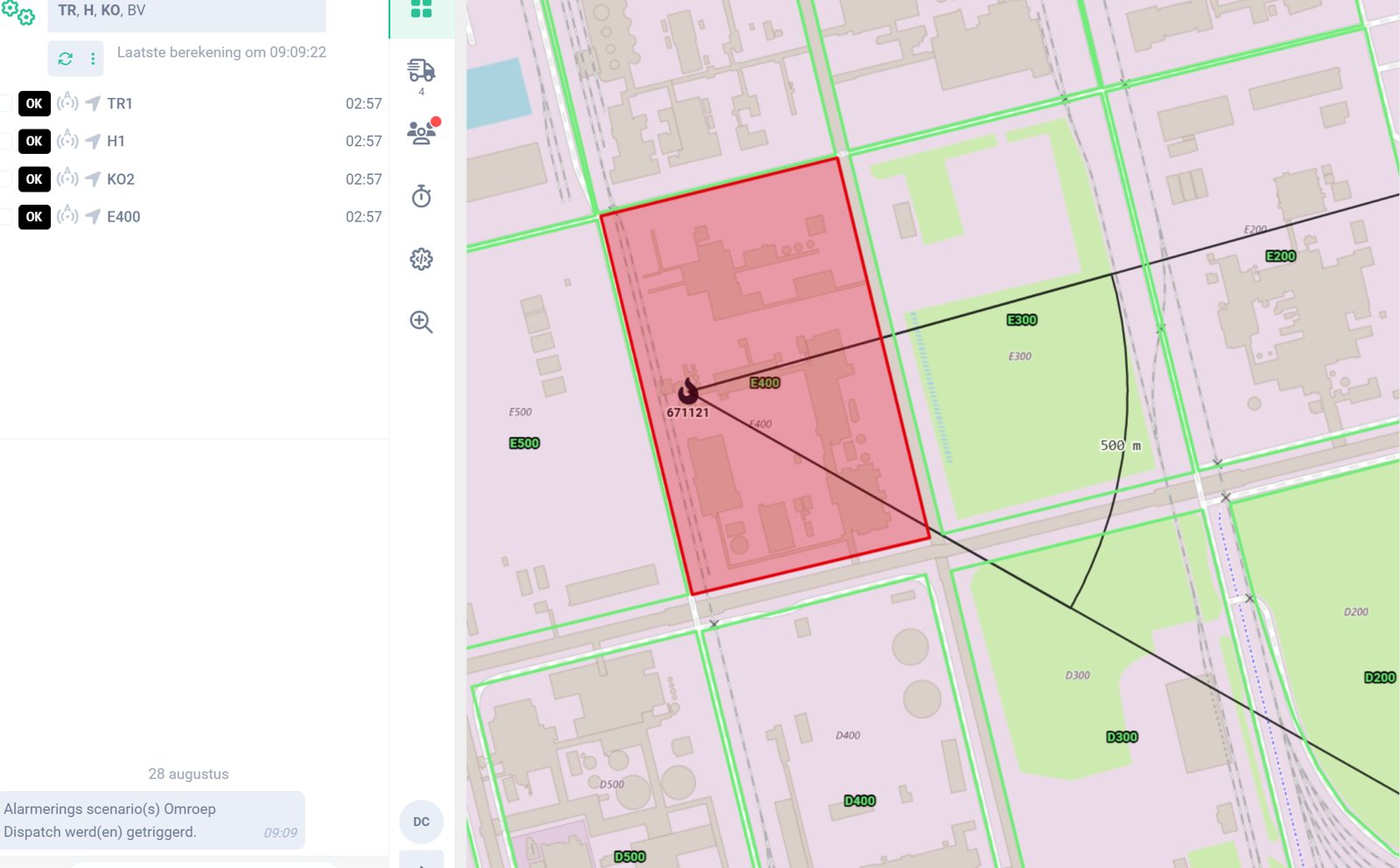
FrontForce Emergency control room

Screenshot from a demo environment with fictional data.

Sound familiar?

What teams struggle with today.

When every second counts, information cannot be fragmented.

Staff shortages and fewer specialised people

Less experienced colleagues have to make the same decisions under pressure.

Procedures that only exist on paper

The emergency plan is complete, but during an incident nobody searches through 150 pages.

Fragmented systems and information

Reports, status updates and procedures are scattered across phones, separate systems and manual records.

Responding faster

In the first minutes of an incident, time is lost searching, calling and coordinating.

Knowledge sits in the heads of a few people

What happens if your most important emergency manager is not there?

Lessons learned disappear after the incident

Evaluations stay buried in reports and do not become structural improvement.

Contractors and subcontractors

Own teams, emergency services and contractors must be able to work together in a short time.

New threats and a changing context

New risks and regulations require procedures that evolve with them.

What does FrontForce Emergency offer?

From report to targeted action.

01 · BRING TOGETHER

All information in one place

Reports, systems, teams and data come together in one operational picture. Everyone knows what is happening, who is in charge and how the situation is evolving.

02 · COORDINATE

From report to targeted deployment

Uniform procedures and instructions guide the next steps. The right people are alerted at the right moment.

03 · AUTOMATE

Trigger actions automatically

Depending on the scenario, FrontForce Emergency can alert people, deploy suitable resources and start linked actions. While teams are still switching gears, the crucial first actions have already happened.

04 · EVALUATE

Insight during and after the incident

Logging and reporting show what happened and which actions were taken. This gives teams a basis to evaluate incidents and exercises, record improvement points and support their reporting.

Features

From intake to reporting.

View all features and filter by your target group.

  • Reporting and intake
  • Alerting and deployment
  • Collaboration and situational picture
  • Logging and reporting
Simulator

What does one minute of fire cost at your site?

Explore an industrial fire scenario. You choose the site type, the response time and the assumed time saving. You see the result immediately.

Illustrative model, not a forecast or performance promise.

  1. Choose your siteSME, large industry or petrochemicals and tank storage.
  2. Set your scenarioAsset value, response time and assumed time saving.
  3. View the resultThe calculated difference appears on screen immediately.
  4. Receive your one-pagerEnter your name, email and company and receive your result as a PDF.
In practice

Proven where
every second counts.

All customer stories
Brussels AirportHulpverleningszone WaaslandZone CentrumHulpverleningszone Zuid-West LimburgSitechBrandweerzone Oost
Compare your way of working

From scattered information to one operational picture.

What support do you need when teams have to act at the same time?

A comparison of typical ways of working
What you needLists and phoneSeparate toolsFrontForce Emergency
Reports and information togetherCollect manuallyDepends on integrationsOne operational picture
Procedures and alertingFollow steps yourselfDiffers per toolDigital procedures and dynamic alerting
Connect control room and fieldCoordinate by phoneIntegration needed between toolsThe same up-to-date information
Start actions automaticallyManual executionDepends on setupLinked actions according to scenario
Reporting and evaluationCompiled afterwardsPer tool or via integrationLogging and reporting built into incident handling

Make your own comparison.

10 criteria, a fillable scorecard and questions to bring to a demo.

View the decision helper
Blog
NEWS

Sitech Command & Control Center × FrontForce Emergency: innovation and collaboration in safety and service

After an extensive market consultation, Sitech chose FrontForce as the partner for its Command and Control Center.

Read more
CASE

Cross-zone dispatching in the province of Limburg

The three emergency zones of the province of Limburg work together on a single instance of FrontForce Emergency. Each zone keeps its overview from its own dispatch room.

Read more
CASE

Hulpverleningszone Waasland chooses FrontForce Emergency

Hulpverleningszone Waasland unites the fire and ambulance stations of Beveren, Kieldrecht, Kruibeke, Melsele, Sint-Gillis-Waas, Sint-Niklaas, Stekene, Temse and Waasmunster. These nine stations work every day to protect more than 219,000 inhabitants of the Waasland region.

Read more
Technology integrations

Connections with systems you already have.

We agree availability and setup per environment during intake.

NC112

Fire services

What the integration doesIncidents arrive directly via the NC112 integration.

In practiceThe dispatcher starts immediately with the incident data. NC112 data is also available in the field intervention module.

ASTRID

Fire services

What the integration doesAlerting of emergency responders via ASTRID.

In practiceThe right people are alerted according to the zone's turn-out procedure.

Fire alarm panels

Seveso · Critical infrastructure

What the integration doesAn alarm from the fire alarm panel starts the agreed scenario.

In practiceAlerting and linked actions start automatically, respecting the IT/OT zoning of industrial sites.

Gas detection

Seveso

What the integration doesDetection alerts come together in the operational picture.

In practiceDepending on the scenario, alerting and linked actions follow.

Cameras and building management

Critical infrastructure

What the integration doesThe system activates cameras and other linked actions.

In practiceFor example, automatically opening exit gates when a unit turns out.

Telephony and Text2Speech

All target groups

What the integration doesCall hundreds of phone numbers at once, with a spoken message.

In practiceMessages are repeated and confirmed. In case of voicemail, a new attempt or an alternative number follows.

GIS and map layers

Fire services · Critical infrastructure

What the integration doesIncidents and units on the map, with route calculation.

In practiceConfigurable map layers such as satellite, GRB and hydrants, also on the in-vehicle tablet.

Payconiq

Fire services

What the integration doesPayment after an intervention, directly in the app.

In practiceFor wasp nest removal, the citizen pays immediately after the intervention.
Trust and compliance

Built for environments with gating criteria.

For Seveso sites and NIS2-regulated organisations, compliance is the gateway, not an appendix. The full dossier is available for your IT and procurement teams.

ISO 27001:2022

Information security

Certified information security management, the recognised framework to demonstrate NIS2 conformity.

ISO 9001

Quality management

Certified across development, delivery and support.

NIS2

NIS2 compliant

The supplier requirements arising from your own NIS2 obligations are covered.

FAQ
What does FrontForce Emergency do?
The platform brings intake, alerting, deployment, collaboration and reporting together in one live operational picture. Control room, crisis organisation and field teams work with the same up-to-date information.
Who is FrontForce Emergency for?
For safety, emergency and HSE managers at Seveso sites, fire service zones and airports, but also critical infrastructure and other high-footfall venues. FrontForce focuses on Belgium and the Netherlands.
How does it connect to existing systems?
We map the desired integrations during an intake. Think of fire alarm panels, gas detection, building management, cameras and — where relevant — NC112 and ASTRID. Availability and setup are agreed per environment.
How does the platform support reporting?
Logging and reporting make incident information and executed actions visible. This supports evaluation and improvement actions. We discuss the desired reports and setup for your operation.
Who supports us after implementation?
FrontForce develops the platform in-house and stays involved after implementation, with 24/7 support. The concrete service is tailored to your environment.
How do we start and what does it cost?
We start with your operation, scenarios and existing systems. Then we map the required components and integrations and you receive a tailored proposal. The simulator shows an illustrative damage scenario, not a software price.
Moving forward together

Bring your scenario.
We show how it works.

In a 30-minute conversation, we walk through your incident handling.

Let's talk